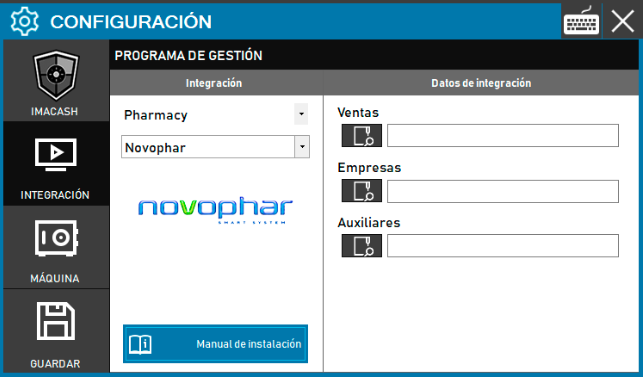
To integrate the Software Novophar Smart System with ImaCash, the technician must install the “VFPOLEDB (NOVOPHAR)” dependency, which can be downloaded from the Cloud ImaCash. Subsequently, Novophar technicians must communicate the paths of the Sales, Business and Auxiliary files.
Steps to follow:
- Previous Step: Install the “VFPOLEDB (NOVOPHAR)” dependency.
- CONFIG → INTEGRATION in ImaCash.
- Management Program:
- Category: Pharmacy
- Integration: Novophar
- Integration data (File Paths):
- Sales: Enter the full path of the Sales file.
- Companies: Enter the full path of the Companies file.
- Auxiliaries: Enter the full path of the Auxiliaries file.
- Save: Click the SAVE button (floppy disk icon).