
ImaCash integration

myGestion

Practical guide to integrate myGestion with ImaCash, review requirements, and speed up deployment.

myGestion
Others

To integrate the My Management Software with ImaCash, the technician must only enter the Username and Password to establish the connection.

Steps to follow:

  1. CONFIG → INTEGRATION in ImaCash.
  2. Management Program:
    • Category: Others
    • Integration: MyGestion
  3. Integration data:
    • User: Enter the access user.
    • Password: Enter the password.
  4. Save: Click the SAVE button (floppy disk icon).
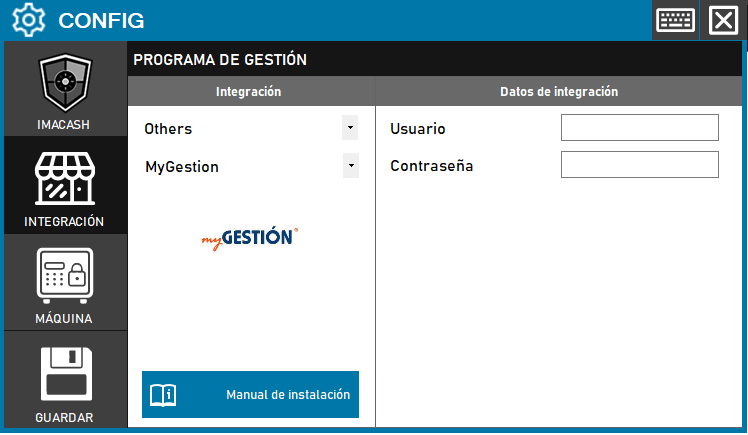
myGestion configuration screenshots

Integration ready to move forward

If this integration matches your software, the next step is moving into real operation

We can help you validate the scope, confirm compatible hardware and prepare the next implementation step.