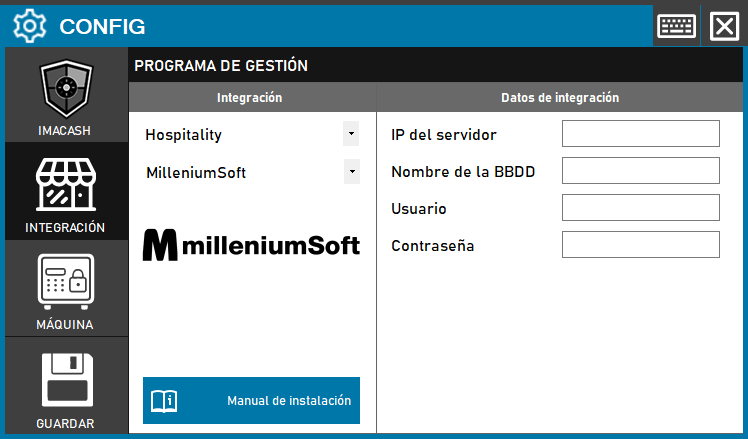
To integrate Software Millenium Soft con ImaCash, el técnico deberá ingresar la IP del servidor, el Nombre de la BBDD, el Usuario y la Contraseña de la base de datos, ya que los técnicos de Millenium Soft deben dar acceso a la BBDD con estas credenciales.El técnico de Millenium Soft, deberá darnos acceso a la BBDD con su respectivo “usuario”y “contraseña”.
Steps to follow:
- CONFIG → INTEGRATION in ImaCash.
- Management Program:
- Category: Hospitality
- Integración: MilleniumSoft
- Integration data:
- Server IP: Enter the IP address of the server.
- Database name: Enter the name of the database.
- User: Enter the access user.
- Contraseña: Private information provided by the administrator. Enter it only in ImaCash.
- Save: Click the SAVE button (floppy disk icon).