LOGIDOM-RSA (Teledom):
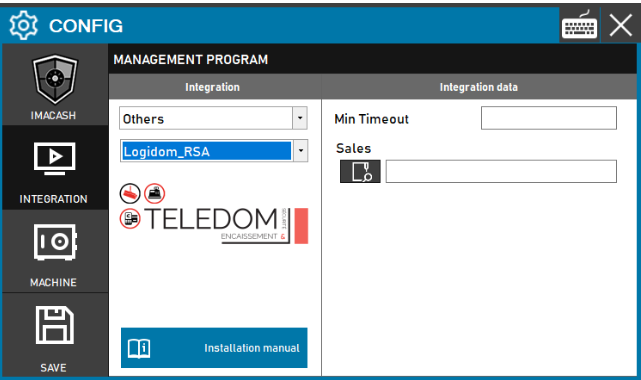
The folder where the “Sales” are exchanged must be specified. The “Time Out” parameter is used to specify how long the payment form will be opened.
Steps to follow:
- Open CONFIG → INTEGRATION in the ImaCash side panel.
- In the MANAGEMENT PROGRAM section, select the following options:
- Category: Others.
- Integration: Logidom_RSA.
- In the Integration data section, complete the following fields:
- Min Timeout – Specify in this parameter how long (in milliseconds) the payment form will remain open.
- Sales: Click the magnifying glass icon to select the folder path where sales files are exchanged.
- Click the SAVE button (floppy disk icon) to apply the configuration.