


La Caisse Integration
To integrate the Caisse Software with ImaCash, the technician must fill in the connection data to the MySQL database (IP, Port, DB, User and Password) and, additionally, specify the Port (ImaApi). Also included is an option to delete transactions by canceling them.
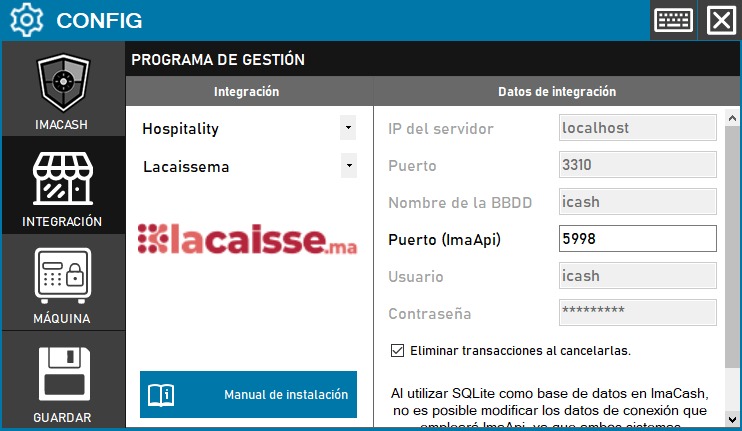
Steps to follow:
CONFIG → INTEGRATION in ImaCash.
Management Program:
Category: Hospitality
Integration: Lacaissema
Integration data:
Server IP: Enter the server IP (e.g. localhost).
Port: Enter the port of the DB (e.g. 3310).
Database name: Enter the name of the database (e.g. icash).
Port (ImaApi): Enter the port of the ImaApi (e.g. 5998).
User: Enter the user (e.g. icash).
Password: Enter the password.
Delete transactions on cancellation: Check the box if this feature is required.
Save: Click the SAVE button