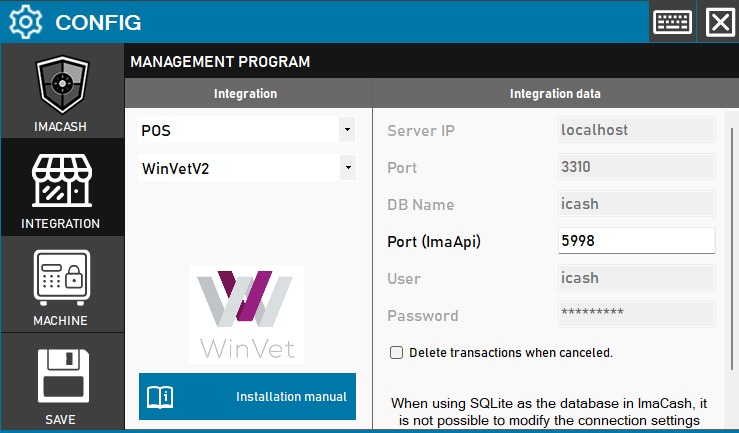
To integrate WinVetV2 Software with ImaCash, the technician must fill in the connection data to the MySQL database (IP, Port, DB, User and Password) and specify the Port (ImaApi). This integration also allows the option to automatically delete transactions if they are canceled.
It is important to note that, to enable communication from the WinVet software itself to ImaCash, it is necessary to contact the WinVet support team to perform the relevant configuration on your system.
Steps to follow:
- CONFIG → INTEGRATION in ImaCash.
- Management Program:
- Category: POS.
- Integration: WinVetV2.
- Integration data:
- Server IP: Enter the server IP (default
- Port: Enter the port of the database (default
- DB Name: Enter the name of the database (default
- Port (ImaApi): Enter the specific port for ImaApi (default
- User: Enter the user (default
- Password: Private information provided by the administrator. Enter it only in ImaCash.
- Delete transactions when canceled: Check this box if you want the system to delete the records of canceled operations.
- Save:
Technical note: If ImaCash is using SQLite As a database, it will not be possible to modify the connection settings from this panel.