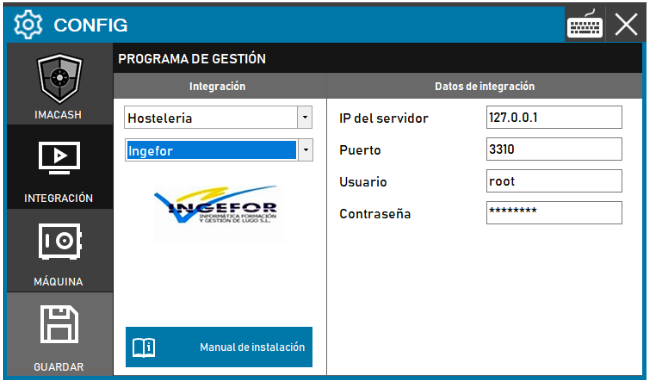
To integrate Ingefor software with ImaCash, the technician must create a local intermediate database named imacash_cajon. In addition, Ingefor technicians must run SQL queries to create the data tables for the connection. In ImaCash, the connection data is filled in with values that are usually default, and the password must be provided by RedPos.
Steps to follow
- Prerequisite: create a local intermediate database named imacash_cajon. Ingefor technicians must run the SQL queries to create the required tables.
- CONFIG → INTEGRATION in ImaCash.
- Management Program:
- Category: Hospitality
- Integration: Ingefor
- Integration data:
- Server IP: Enter the server IP (e.g. 127.0.0.1).
- Port: Enter the port (e.g. 3310).
- User: Enter the user (e.g. root).
- Contraseña: Private information provided by the administrator. Enter it only in ImaCash.
- Save: Click the SAVE button (floppy disk icon).
Note: The sales file is usually TPVMadrid.mdb.