Bingo integration

Metronia

Connect Metronia to ImaPlay Server: prepare the venue integration, configure private IP and Port details and check communication before operational use.

Metronia

Set up Metronia in ImaPlay Server

Prepare the installation

  • The provider must enable Metronia communication and confirm the venue version and profile. Configure the integration in ImaPlay Server using the installation’s Windows user and permissions.
  • ImaPlay Server connects over TCP to the service specified by the provider. IP and Port are separate private details; there is no universal port and the service does not need to be exposed to the Internet.
  • This page describes a bingo software integration with ImaPlay. Metronia is neither a machine selection in ImaCash nor a cash recycler model.

A connection does not confirm complete receipt of games, prizes or vendors, nor validate physical payouts, banknote detection or discrepancy-free reconciliation. Confirm the installation scope with the provider.

Step by step

  1. In ImaPlay Server, open Settings > Integration and select “ModMetronia”. Prepare this change with the venue administrator while no operations are in progress.
  2. In IP, enter only the private service address supplied by the administrator, without a protocol, path or port.
  3. In Port, enter the TCP port confirmed by the Metronia provider. The ImaPlay Server computer must be able to reach that destination on the authorised network.
  4. If your version displays Test connection, use it to check TCP access. Then save the selection and fields with Save; a connection test neither saves changes nor confirms the complete exchange.
  5. Before serving customers, check the received data and intended flows between Metronia and ImaPlay under supervision. The venue integration and cash handling devices require their own validation.

Explore ImaPlay

Visit the official Metronia website

Integration reference

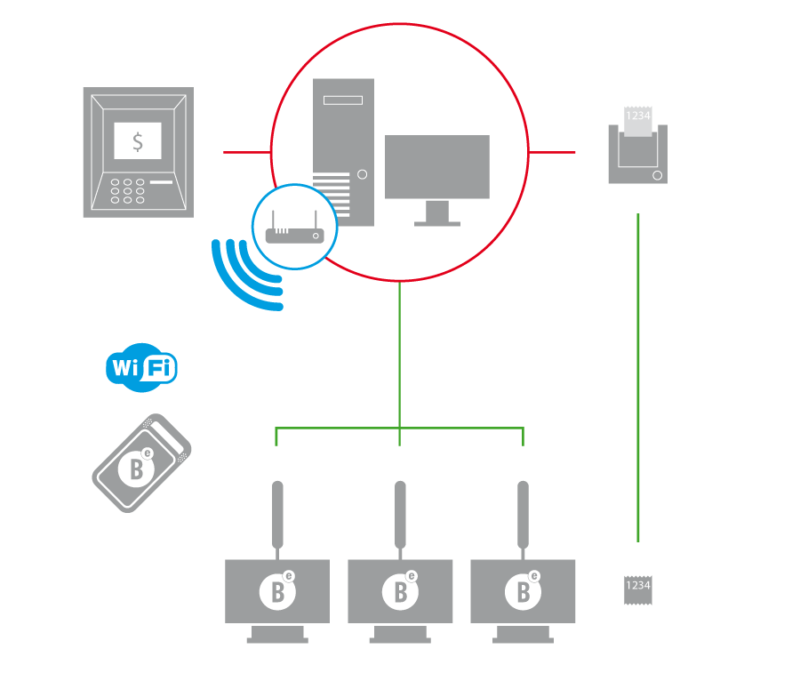
Illustrative diagram of a Metronia installation

Metronia

Metronia is a bingo integration reference for ImaPlay, not an ImaCash machine model. The image is an illustrative diagram and does not certify a specific topology or set of devices.

Bingo integration

Discuss the installation

A connection does not confirm complete receipt of games, prizes or vendors, nor validate physical payouts, banknote detection or discrepancy-free reconciliation. Confirm the installation scope with the provider.