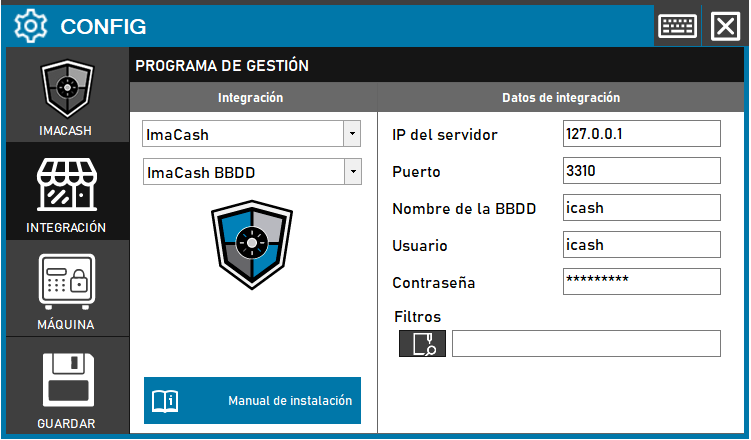
Required action: complete the network fields and access credentials to enable communication with the icash database.
Steps to follow:
- Open CONFIG → INTEGRATION from the ImaCash side panel.
- In the Management software section, select the following values:
- Category: ImaCash.
- Integración: ImaCash BBDD.
- In the Integration data section, enter the corresponding technical information:
- IP del servidor: por defecto Private information provided by the administrator. Enter it only in ImaCash. si es local.
- Port: indicate the connection port (example: 3310).
- Database name: enter the name of the database (example: icash).
- User: name of the access user (example: icash).
- Contraseña: Private information provided by the administrator. Enter it only in ImaCash.
- Filters: field to specify search criteria or data filtering if necessary.
- Click the SAVE button (floppy disk icon) to confirm the changes.