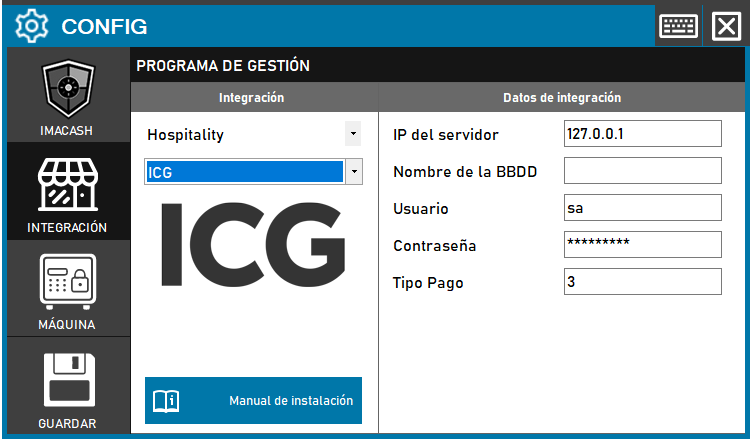
The technician must fill in the “Server IP”, “Database name” and “Password” for the server where ICG is installed. The user name is usually the default one.
Steps to follow:
1. Open the integration settings:
- Go to CONFIG → INTEGRATION in your ImaCash system
2. Select the POS system:
- Select the «Hospitality» category
- A continuación, selecciona ICG del menú desplegable
3. Complete the connection details:
- IP del servidor: Introduce la dirección IP del servidor (ejemplo: Private information provided by the administrator. Enter it only in ImaCash.)
- Nombre de la BBDD: Nombre de la base de datos de ICG
- User: user with access permissions (example: sa)
- Contraseña: Private information provided by the administrator. Enter it only in ImaCash.
- Tipo Pago: Identificador del tipo de pago (ejemplo: 3)
4. Save the configuration:
- Click the SAVE button
Note: in some installations, an additional instance name may be required. Example: localhost\icg
Important: check which ICG version is installed at the customer before selecting the correct integration variant.