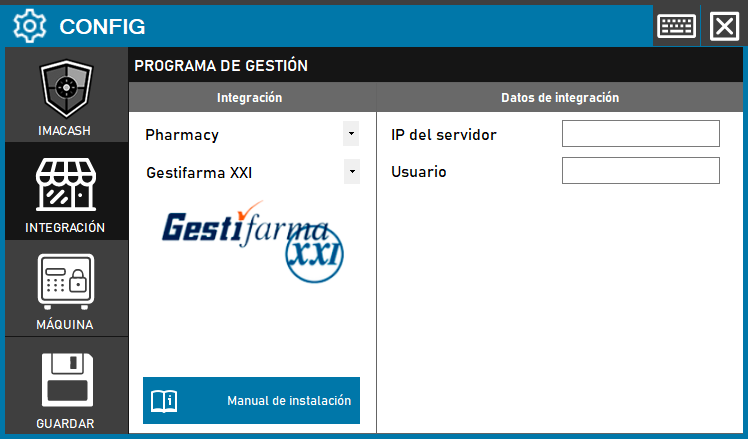
To integrate the Software Gestifarma XXI with ImaCas h, the technician will need to install an ODBC dependency, modify operating system network files and create an ODBC connection before configuring the server and user IP in ImaCash.
Previous steps (Operating system and ODBC connection):
- Install NODBC Dependency: Install the “NODBC GESTIFARMA XXI” dependency downloadable from ImaCloud.
- Modify network files:
- In the path “C:\Windows\System32\drivers\etc”:
- Enter the IP of the server and its name (MAIN) in the “host” file.
- Add the “PRINCIPAL 2000/tcp” code to the “services” file. It is recommended to put it in the corresponding numerical order.
- In the path “C:\Windows\System32\drivers\etc”:
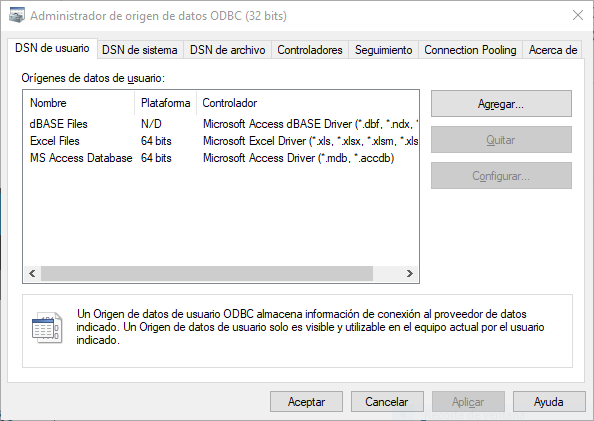
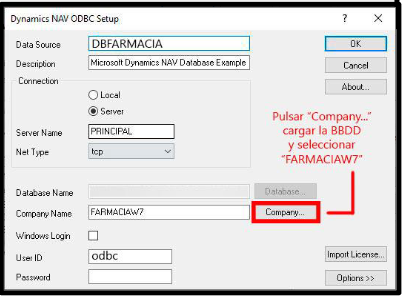
3. Create ODBC: Access the ODBC from Windows and create the data source “odbc” for the connection with “GESTIFARMA XXI”.
4. Create ODBC User: “GESTIFARMA XXI” technicians must create a user to connect with “odbc”.
Steps in ImaCash:
- CONFIG → INTEGRATION in ImaCash.
- Management Program:
- Category: Pharmacy
- Integration: Gestifarma XXI
- Integration data:
- Server IP: Enter the name of the ODBC that has been created (e.g. odbc).
- User: Enter the ODBC User ID (default is: odbc).
- Save:
- Click the SAVE button (disk icon).
Important:
This integration will have an additional cost on top of the ImaCash license.