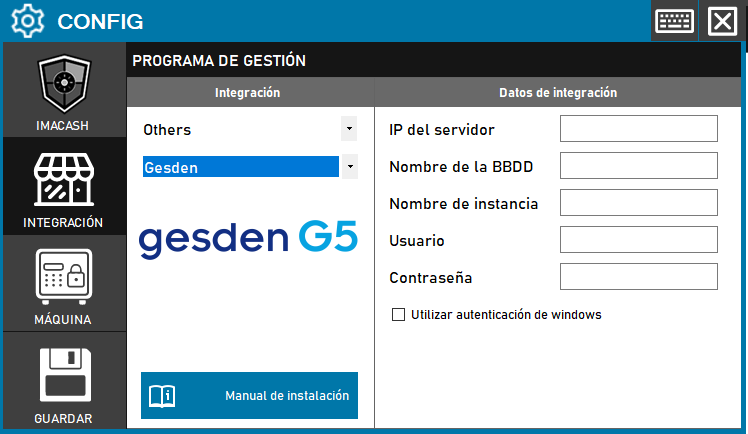
To integrate Gesden G5 Software with ImaCash, the technician must enter the complete connection data for the Gesden database, including the server IP, database name, instance name and access credentials.
Steps to follow:
- Click on CONFIG → INTEGRATION in ImaCash.
- On the "Management Program" screen, locate:
- Category: Others
- Integration: Gesden
- Integration data:
- Server IP: Enter the IP address of the server where the DB is located.
- Database Name: Enter the name of the database.
- Instance name: Enter the name of the instance.
- User: Enter the access user.
- Contraseña: Private information provided by the administrator. Enter it only in ImaCash.
- Use Windows Authentication: Check if authentication is performed using Windows.
- Save
- Click the SAVE button (disk icon).