Set up FarmaLog with ImaCash
FarmaLog sends new operations to a TCP listener opened by ImaCash. The provider must confirm the edition and exchange mode for the installation. Configure the cash machine separately; this guide does not validate every model or physical operation.
1. Prepare the exchange with the provider
Ask the provider to enable sending to the ImaCash computer and agree on an available TCP port on that computer, with no universal value. Check access under the actual ImaCash Windows user and with the installation’s network protections in place. Do not expose the service to the Internet or disable protections to connect it. The SafePay reference in the old manual is a FarmaLog-side setting that the provider must confirm; it does not identify the machine to select in ImaCash or validate other models.
2. Select the profile
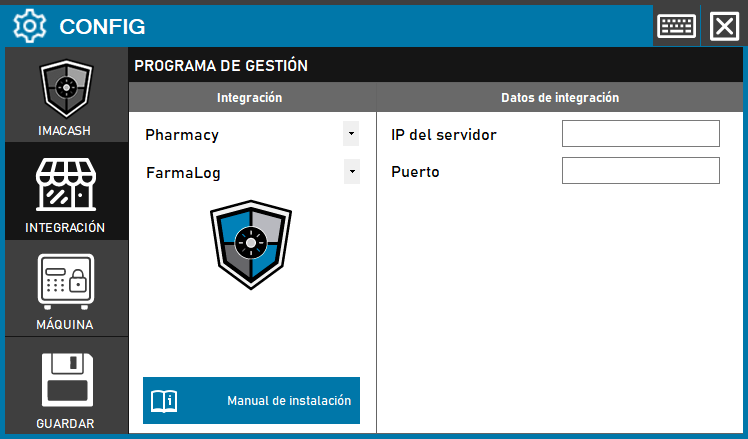
Open Configuration > Integration, choose POS and select FarmaLog. The historical screenshot shows Pharmacy and a Guardar button; the current selector uses POS and saving is confirmed when closing.
3. Enter the address and port
Server IP takes the private IPv4 address of a local interface on the computer running ImaCash, rather than the FarmaLog server’s address. Port takes the agreed local TCP port. The administrator supplies these private details and the provider configures FarmaLog to send to that destination. This profile does not request a database, account, password or exchange folder.
4. Save when closing
Close Configuration and confirm saving when prompted; follow any proposed restart when applicable. Starting may open the TCP listener. Saving or seeing a connected indicator does not validate that FarmaLog has sent an operation, acknowledged the reply or completed a payment.
5. Receive new operations
The integration receives requests containing a reference, terminal, operator and amount in hundredths. Check amount, sign and currency with the provider. The recorded date is the time of reception in ImaCash. Cash is distinguished from other inputs, but this classification does not validate card or mixed-payment authorization or settlement. Changing the synchronization date does not recover earlier operations.
6. Check scope and filters
Check received terminal and operator identifiers and local Configuration > Filters settings with support. This profile does not discover terminal, employee or company catalogs. Do not assume separation between companies or terminals from an empty list. Items, shifts and bank totals have no validated scope.
Confirmations and cancellations
Confirmation attempts to return the outcome to the originating connection. Local sending does not validate that FarmaLog received it or closed the operation. Local rejection also does not confirm remote cancellation or the return of cash. Do not promise automatic recovery or absence of duplicates after a disconnection.
7. Verify before commercial use
Arrange a supervised test comparing reference, amount, sign, currency, terminal, operator and outcome across FarmaLog, ImaCash and the machine, including reception of the outcome at the source. If the outcome is uncertain, review both systems and actual cash with support before repeating, resynchronizing or restarting. This documentation review does not replace physical validation.