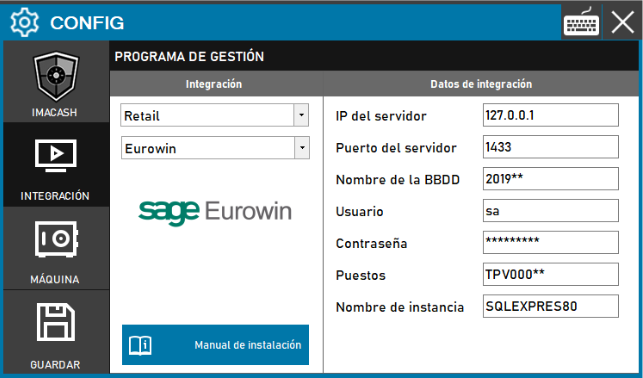
To integrate Sage Eurowin Software with ImaCash, the technician must configure the SQL database connection parameters. Some of this information, such as the database name and workstations, can be obtained by accessing Sql Server Management Studio directly.
Steps to follow:
- CONFIG → INTEGRATION in ImaCash.
- Management Program:
- Category: Retail.
- Integración: Eurowin.
- Integration data:
- IP del servidor: Introducir la dirección IP (por defecto Private information provided by the administrator. Enter it only in ImaCash.).
- Server port: Enter the port SQL (default 1433).
- Database name: Enter the name of the database (e.g. 2019**).
- User: Enter the user (by default sa).
- Contraseña: Private information provided by the administrator. Enter it only in ImaCash.
- Positions: Define the position identifier (e.g. TPV000**).
- Instance name: Specify the connection instance (e.g. SQLEXPRES80).
- Save
- Click the SAVE button (disk icon).
Technical note: The "*" characters must be replaced with the specific numbers or letters that correspond to the table or customer configuration.