Set up Dominium Plus with ImaCash
Dominium Plus is software from Coopidrogas. Its ImaCash profile is named DominiumPlus. Confirm the edition and access supported for your installation; configure the cash machine separately.
Prepare access
The provider must confirm the SQL Server destination and active database, the required query access and the Windows account running ImaCash. Do not use names, accounts or passwords taken from examples or screenshots.
Select the profile
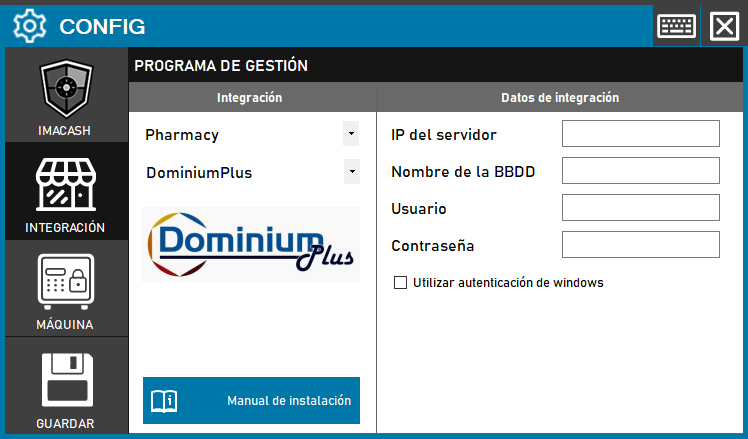
Open Configuration > Integration, select POS and then DominiumPlus. Server IP takes the prepared SQL destination, including its instance when applicable. Database name is the active database confirmed by the provider, not a folder or DSN.
Choose the prepared authentication
Windows authentication is optional. Enable it only if the provider has authorized the actual ImaCash Windows user. If SQL authentication has been prepared, leave it unchecked and enter the private Username and Password. Do not mix both workflows or change permissions for testing.
Review payment methods
The connector uses one cash identifier and one card identifier confirmed with the provider, rather than a list of card identifiers. Review Accept cards with support before enabling it. The received classification does not prove a bank payment.
Save when closing
Close Configuration and confirm saving when prompted. Follow any proposed restart when applicable. Saving checks the connection; it does not prove that all documents are read or that a payment has completed.
What is read and what to check
Documents are read by date and time together with the prepared payment methods. Terminal and operator filters limit the local view; they do not grant permissions or guarantee isolated capture at the source. Confirm the meaning of statuses, signs and amounts; do not assume a correct mixed payment breakdown, a full history or absence of duplicates.
Validate commissioning
Compare reference, amount, sign, currency and payment method between both programs. Confirming in ImaCash does not write a closure or cancellation in Dominium Plus. If the outcome is uncertain, check both systems and the actual cash before repeating, resynchronizing or restarting. This guide does not validate other editions, Conexión Farma or the physical equipment.
Historical screenshot with empty fields
This image is an older visual reference: it shows the former Pharmacy category and Save button. For the current profile, follow POS and saving on close as described above. Its empty fields do not provide access details.