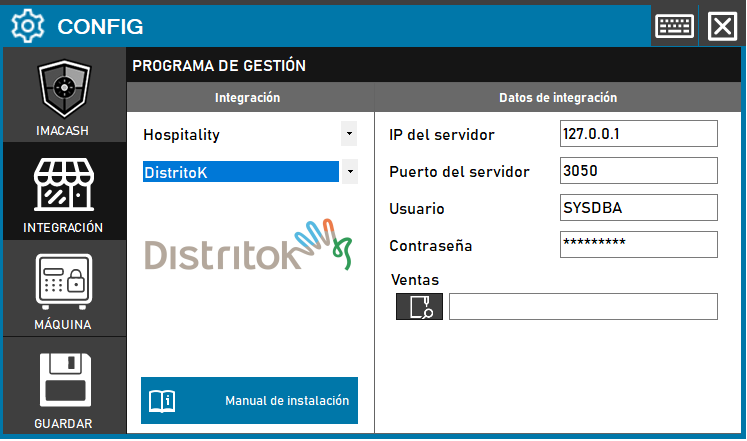
DistritoK (direct database connection)
The values should be the default ones shown, but they may change. The only value to fill in is the location of the “Sales” folder.
Steps to follow:
1. Open the integration settings:
- Go to CONFIG → INTEGRATION in your ImaCash system
2. Select the POS system:
- Select the «Hospitality» category
- Then select Distrito K from the drop-down menu
3. Complete the connection details:
- Server IP: Server IP address (example: 127.0.0.1)
- Server port: Connection port (example: 3050)
- User: User with access permissions (example: SYSDBA)
- Contraseña: Private information provided by the administrator. Enter it only in ImaCash.
- Sales: Click the folder icon and enter the path where District K stores sales files
4. Save the configuration:
- Click the SAVE button