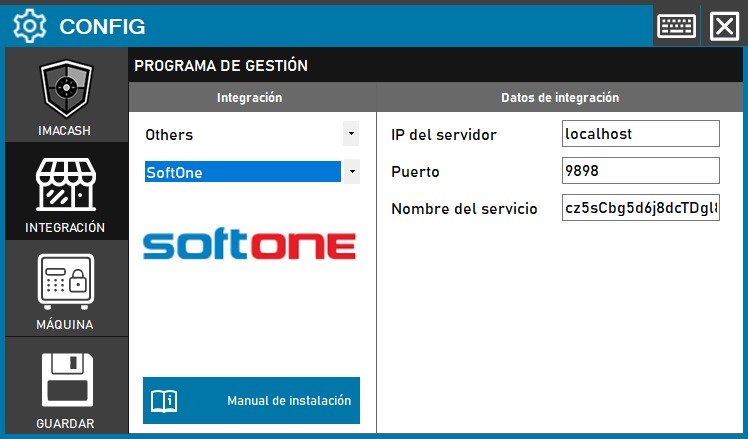
The integration with SoftOne uses a hybrid communication method based on HTTP services and authentication keys.
Action Required: Configure the local listener service and the software server access key.
Steps to follow:
- CONFIG → INTEGRATION in ImaCash.
- Management Program:
- Category: Others.
- Integration: SoftOne.
- Integration data:
- Server IP: Generally set to localhost for the listening service.
- Port: Enter the port specified for the HTTP service (e.g. 9898).
- Service name: Enter the authentication key required to consult the SoftOne server here.
- Save: Click the SAVE button.
[!IMPORTANT] Security Note: Since the SoftOne software is actively sending the sale, if ImaCash remains closed at the time of the transaction, sales will not be received later.