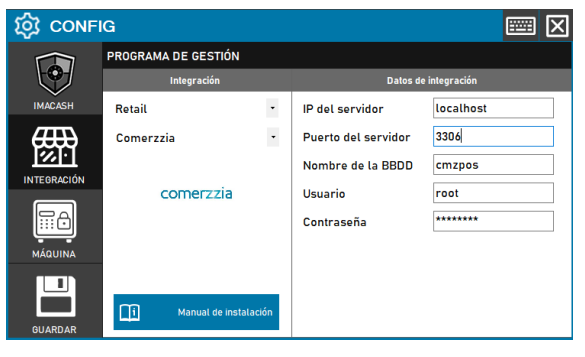
Comerzzia configuration
ImaCash captures Comerzzia tickets through read-only MySQL access. The Comerzzia administrator must confirm the server, port, active database and a dedicated SQL account before configuring the integration.
Steps to follow
- Get the database credentials: Ask the administrator for the host or IP address, MySQL port, exact name of the active database and an account authorised to connect from the ImaCash computer. Enter private access details only in ImaCash.
- Access the integration settings: Go to Configuration > Integration in ImaCash.
- Select the POS system: Select the POS category used by the current catalogue.
- Then select Comerzzia from the drop-down menu
- Complete the connection details:
- Server IP: MySQL server host or IP confirmed by the DBA, without http:// or https://. Use localhost only when MySQL runs on the same computer as ImaCash.
- Server port: Enter the exact MySQL port supplied by the DBA in its separate field; 3306 is only the usual value, not a guarantee.
- Database name: Exact name of the active Comerzzia database. Do not guess the name or use a historical copy or another store's database.
- User: Dedicated read-only SQL account with SELECT; do not use root or an administrator account. INSERT, UPDATE, DELETE and DDL permissions are not required.
- Password: Private information provided by the administrator. Enter it only in ImaCash.
- Save the configuration: Save the connection settings and select the payment methods used by this Comerzzia installation.
Minimum tables and permissions
The account must have SELECT permission on d_tickets_tbl, d_usuarios_tbl, d_medios_pago_tbl and d_tiendas_cajas_tbl in the active Comerzzia database, and read access to metadata for existing indexes, without write or administrative permissions.
Payment methods and capture scope
Configure cash and card codes separately using codmedpag from d_medios_pago_tbl and check their meaning against desmedpag; do not assume universal codes. Review register and user filters against codcaja, usuario, desusuario and activo in their catalogues.
ImaCash captures Comerzzia sales and refunds. For mixed payments, only the cash portion is collected through the machine. The integration is read-only: it does not modify tickets or record payment confirmations in Comerzzia.