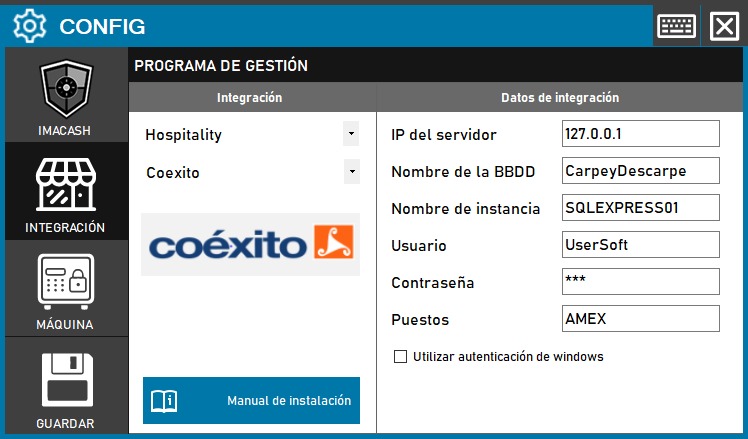
Coexito configuration
To integrate Coéxito with ImaCash, the technician must configure the connection to the server where the Coéxito system is installed.
Steps to follow
- Access the integration settings:
- Go to CONFIG > INTEGRATION in your ImaCash system
- Select the POS system:
- Select the POS category, in this case «Hospitality»
- Then select Coexito from the drop-down menu
- Complete the connection information:
- Server IP: Enter the IP address of the server where Coéxito is installed (example: 127.0.0.1 for local server)
- Database name: Database name (example: CarpeyDescarpe)
- Instance Name: Name of the SQL Server instance (example: SQLEXPRESS01)
- User: User with access permissions to the database (example: UserSoft)
- Contraseña: Private information provided by the administrator. Enter it only in ImaCash.
- Positions: Enter the identifier of the jobs (example: AMEX)
- Use Windows Authentication: Check this box if you want to use Windows Authentication instead of SQL username and password.
- Save the configuration:
- Click the SAVE button (save icon) at the bottom left
Note: If you activate the “Use Windows Authentication” option, it will not be necessary to complete the username and password fields, since the system will use the Windows credentials of the computer. The "Stands" field allows you to specify the terminals or points of sale that will be integrated.