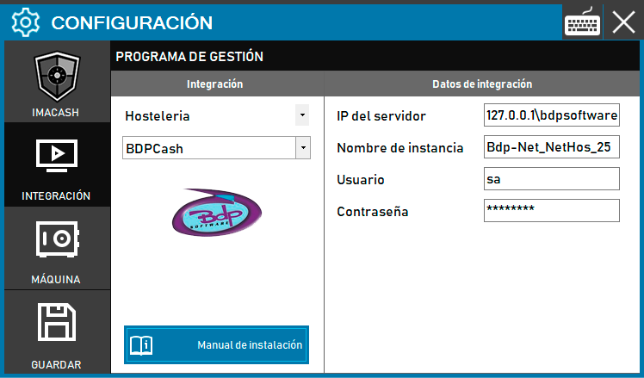
BDPCash configuration
To integrate BDP in Cash/Lean mode:
- Access the integration settings:
- Go to CONFIG → INTEGRATION in your ImaCash system
- Select the POS system:
- Select the «Hospitality» category
- Next, select BDPLean from the dropdown menu
- Complete the connection information:
- Server IP: Enter the IP address of the server where BDP is installed (example: 127.0.0.1 or localhost)
- Instance name: Enter the name of the SQL instance (example: Bdp_Net_NetHos_25)
- User: user with access permissions (example: sa)
- Contraseña: Private information provided by the administrator. Enter it only in ImaCash.
- Save the configuration:
- Click the SAVE button
Note: The technician will have to fill in the “Server IP” where BDP is installed. The other data is usually the default.
Important: Choosing the correct variant will depend on the BDP version installed and the type of integration required by the customer. Check with the person responsible for the BDP system which variant is appropriate before proceeding with the configuration.