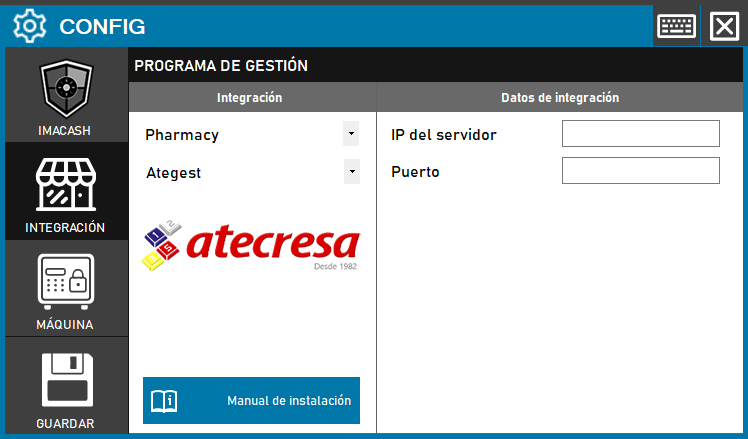
The ATEGEST integration with ImaCash works via socket, so it requires a simple network connection setup.
Steps to follow
- Access the integration settings:
- Go to CONFIG > INTEGRATION in your ImaCash system
- Select the POS system:
- Select the POS category, in this case «Pharmacy»
- Next, select ATEGEST from the dropdown menu
- Complete the connection information:
- Server IP: Enter the IP address of the server where ATEGEST is running
- Port: Indicates the socket port configured for communication with ATEGEST
- Save the configuration:
- Click the SAVE button (save icon) at the bottom left
Note: This integration uses socket communication, allowing real-time data exchange between ATEGEST and ImaCash. Make sure the specified port is open and accessible on the server's firewall.