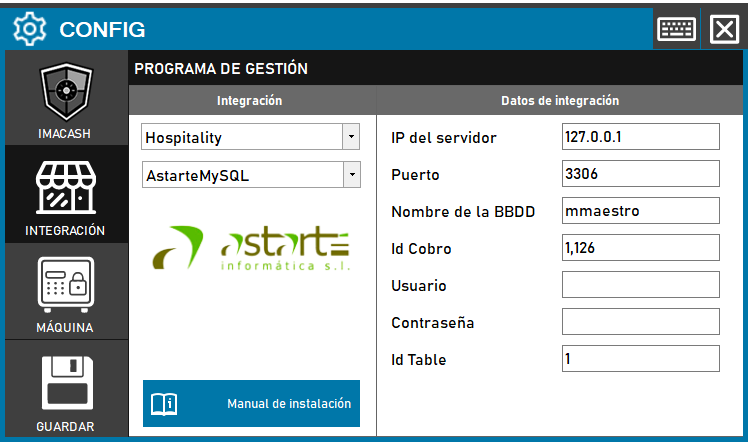
Steps to follow:
- CONFIG → INTEGRATION in ImaCash.
- Management Program:
- Category: Hospitality
- Integration: ASTARTE MYSQL
- Integration data:
- IP del servidor: Introducir la dirección IP del servidor (ej. Private information provided by the administrator. Enter it only in ImaCash.).
- Port: Enter the port (e.g. 3306).
- Database name: Enter the name of the database (e.g. mmaestro).
- Collection Id: Enter the collection ID (e.g. 1,126).
- Contraseña: Private information provided by the administrator. Enter it only in ImaCash.
- Id Table: Enter the ID of the table (ex. 1).
- Save:
- Click the SAVE button (disk icon).