Configure Aniwin with ImaCash
The ImaCash selector is named Aniwin. The supplier currently presents Aniwin.Net ERP; ask its technician to confirm the edition, version and data structure of your installation before using this connector.
Preparation and configuration
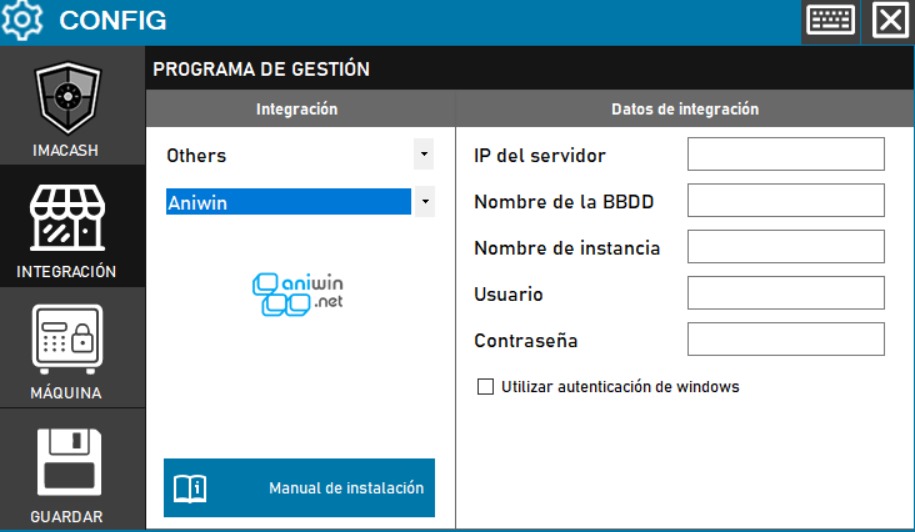
- Open Configuration > Integration, select the POS category and then Aniwin.
- Fill in Server IP, Database name and Instance name using the private destination confirmed by the Aniwin administrator. The database must be the active one for this installation.
- Choose the authentication agreed with the administrator. Use Windows authentication uses the Windows identity running ImaCash; SQL mode uses a private Username and Password with the appropriate query permissions.
- Save to check the connection. When Cash type and Card are requested, select the actual, distinct Aniwin payment methods. If no options appear, ask your technician to check the query; do not assume it is configured. Enable Accept cards only if those tickets must also be included.
- Complete saving and compare known documents, amounts, dates and sellers. Check tickets and cash movements separately before enabling automatic use.
If Instance name is filled in, that SQL destination takes precedence over Server IP; it is not automatically completed by combining it with the IP. Ask the administrator for the full destination. This form has no separate port field.
Tickets and payment methods
Tickets are included only when their payment method matches the selected cash or card method. Other methods are excluded. The ticket amount is used without calculating a universal breakdown of mixed payments, credit or change. Accept cards does not authorize a bank payment.
The connector also reads certain cash movements and presents them as cash. This read does not apply the ticket payment methods. The supplier must confirm their meaning, especially if used for supplier operations, and the representation of outgoing amounts. The review starts at the beginning of the synchronization reference day: check dates, amounts, signs and scope before resynchronizing. This does not prove a physical cash payout.
Sellers, workstations and filters
Sellers are read from Aniwin and filters must match their actual names and identifiers. The workstation published by this connector is generic: it does not identify a physical till or establish separation by terminal or shop. Also review the active local filters.
Scope and checks
This connector reads tickets and the supported cash movements; it does not import products or shifts or send confirmations or cancellations to Aniwin. Cancelling in ImaCash does not prove cancellation in the POS. A successful connection does not establish complete capture or physically validate a combination of software, computer and cash machine.
The screenshot preserves an earlier interface with the Others category and empty fields. In the current version select POS. The existing logo identifies Aniwin.net; it does not by itself establish compatibility with a particular edition or version.