Animalia configuration
To integrate Animalia with ImaCash, the technician must first install a required dependency and then configure the sales file path.
Steps to follow
- Install the VFPOLEDB dependency:
- Before configuring the integration, the VFPOLEDB dependency must be installed
- You can download it from ImaCash Cloud or request it from technical support
- Access the integration settings:
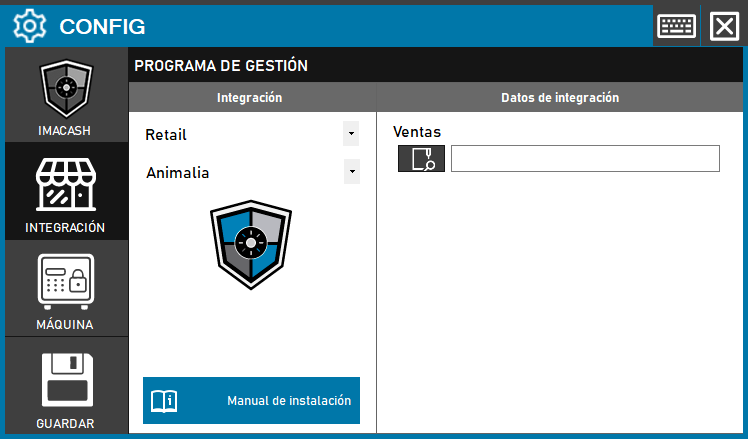
- Go to CONFIG > INTEGRATION in your ImaCash system
- Select the POS system:
- Select the POS category, in this case “Retail”
- Then select Animalia from the dropdown menu
- Set the data path:
- Sales: Click on the folder icon and enter or select the full path where Animalia stores the sales file
- Save the configuration:
- Click the SAVE button (save icon) at the bottom left
Important prerequisite: Without installing the VFPOLEDB dependency, the integration will not work correctly. Be sure to complete this step before proceeding with setup.