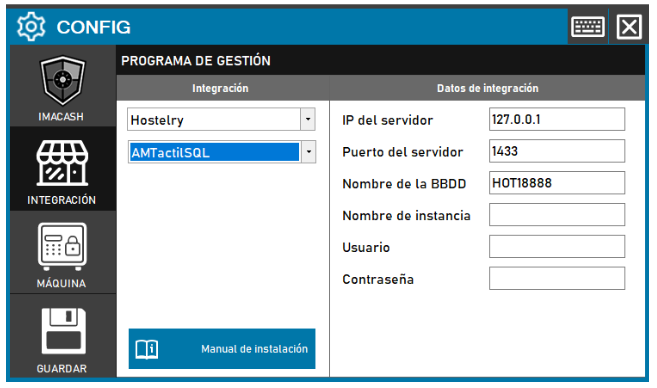
Required Action: Fill in the network fields and access credentials to the SQL database to allow communication between both systems.
Steps to follow:
- Open the CONFIG → INTEGRATION menu in the ImaCash interface.
- In the Management Program section, select the following parameters:
- Category: Hostelry.
- Integration: AMTactilSQL.
- In the Integration Data section, complete the server technical information:
- Server IP: Enter the IP address where the database resides (example:
- Server port: Indicates the connection port (example:
- Database Name: Name of the SQL database (example:
- Instance Name: Specifies the name of the SQL Server instance if the installation requires it.
- User: Name of the user with access permissions to the database.
- Contraseña: Private information provided by the administrator. Enter it only in ImaCash.
- Click the SAVE button (disk icon in the lower left corner) to confirm the changes.
Note: IP, port, and database name values may vary depending on the specific client installation. Make sure both parts are configured correctly for the integration to be functional.