
ImaCash integration

AMTactilAccess

The Amtactil integration with ImaCash requires two steps: first specify the Access file path, then configure the SQL connection details

AMTactilAccess
Hospitality

AMTactilAccess configuration

Steps to follow

  1. Access the integration settings:
    • Go to CONFIG → INTEGRATION in your ImaCash system
  2. Select the POS system:
    • Select the POS category, in this case "Hostelry"
    • Then select AMTactilAccess from the dropdown menu
  3. Set the Access file path:
    • Sales: Click the folder icon and enter or select the full path where the Amtactil Access database file is located
  4. Save the configuration:

Click the SAVE button (save icon) at the bottom left
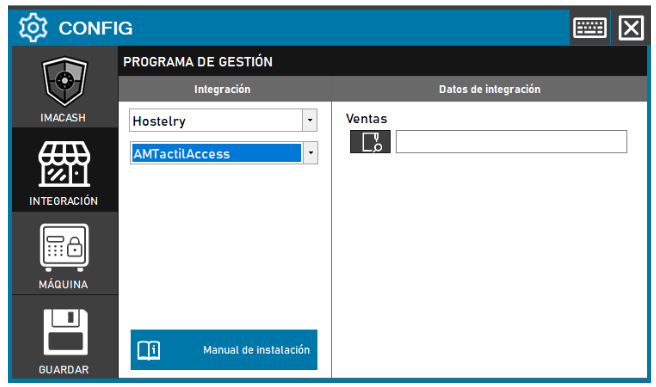
AMTactilAccess configuration screenshots

Integration ready to move forward

If this integration matches your software, the next step is moving into real operation

We can help you validate the scope, confirm compatible hardware and prepare the next implementation step.