Configure AM Táctil in ImaCash
AMTactilAccess and AMTactilSQL are alternatives for different AM Táctil installations. Ask the supplier which mode and version are prepared. They are not consecutive steps and both must not be configured for the same capture.
Select and save the mode
- Open Configuration > Integration and select POS > AMTactil > AMTactilAccess or POS > AMTactil > AMTactilSQL as confirmed by the supplier. Preserve the working configuration and change the selection with no operations in progress.
Access mode: AMTactilAccess
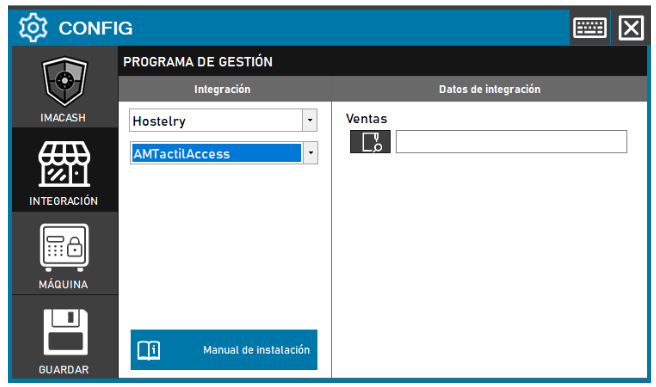
Under Transactions, select the complete active Access file supplied by the provider. This is a specific file, not a folder or historical backup. The earlier screenshot says Sales and Hostelry; the current path uses Transactions and POS.
The ImaCash computer needs Microsoft ACE OLEDB 12.0 and a compatible 32-bit environment. Check file access under the actual Windows user. The form offers no file username or password. The supplier must confirm a source this mode can open without dialogs. Do not add an SQL connection afterwards for this selection.
SQL Server mode: AMTactilSQL
Fill in Server (IP), Port, Database name, Instance name, User and Password using the private active database details provided by your administrator. Use an account with the required read permissions; do not copy sample accounts or details from old screenshots.
The instance is used only with the connector’s default port; a different port takes priority. Confirm the actual profile with the administrator and do not assume a universal value. This mode requests no Access file and offers no Windows authentication checkbox.
Save the configuration under the user running ImaCash. Check connection, operation capture and employee list separately. A successful connection or empty list does not establish complete operation or compatibility with every version.
Amounts and payment methods
Both modes read movements associated with POS tickets. Cash or card classification comes from AM Táctil data; there are no dedicated payment-method selectors. With Accept cards disabled, operations classified as card are excluded; enabling it permits their handling in ImaCash without authorising bank payments. Confirm amounts and classification: do not assume a breakdown of mixed payments, credit or change.
The amount retains its sign. A negative value does not prove cash left the machine. A missing operation, incomplete data or absent name does not itself establish cancellation or lack of activity.
Workstations and employees
Access reads employees but does not identify the workstation in operations. Do not assume a till or terminal filter is valid because the POS has a list; confirm its scope before enabling it.
In SQL, workstations correspond to the received document series, not necessarily physical terminals. Both modes use the ticket employee. Check actual names and identifiers and which operations the local filters include or exclude.
Checks and limitations
These modes read data: they do not import items or write confirmations, refusals or cancellations to AM Táctil. Cancelling in ImaCash does not establish a POS change. Check the flow with the supplier without real payments or refunds to test this guide; documentation and software tests do not replace supervised physical validation.
The retained screenshot shows the earlier Access form with an empty field. Use it to identify the file field and follow the current POS and Transactions path. SQL connection details are private and are not shown in images.